
Storage and quotas
Available in:AdvancedTeam
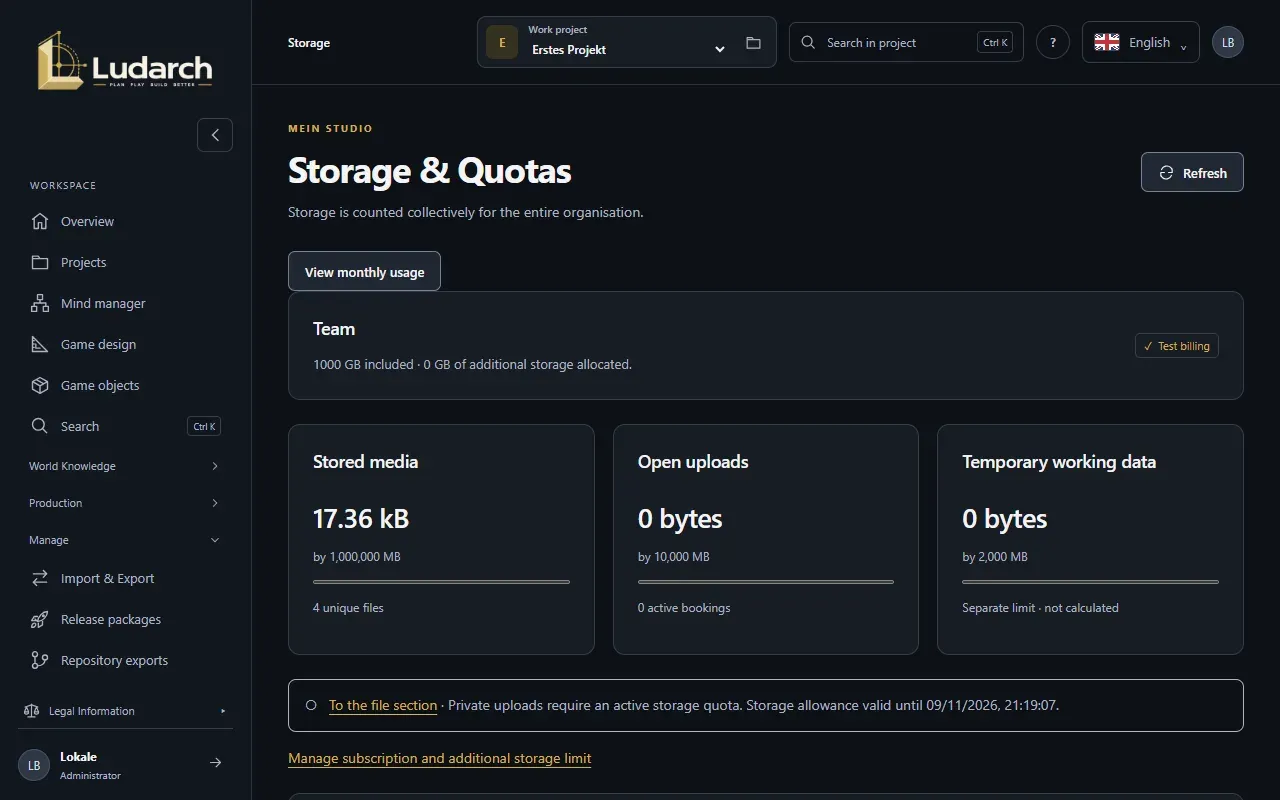
In the Advanced and Team plans, Ludarch stores files and media directly. Under Manage → Storage you see how much of it your studio uses. Storage is counted for the whole organisation together, across all projects.
The Basic plan has no Ludarch file storage, so this page does not appear there. Your files are then kept in your storage connections.
What the figures mean
Section titled “What the figures mean”At the top you see your plan, the included storage and the additional storage you have allowed. Below are three figures:
| Figure | Meaning |
|---|---|
| Stored media | All stored original files. Identical files count only once within the organisation. |
| Open uploads | Space reserved for uploads in progress. |
| Temporary working data | Previews and intermediate states. It has its own limit and is not billed. |
If a limit is exceeded, Ludarch accepts no further uploads. Existing files are kept.
Storage events shows, on request, each accepted file with its time, the change and the total afterwards.
View monthly usage
Section titled “View monthly usage”- Click View monthly usage.
- Choose the Month (UTC) and click Show usage.
- Ludarch shows the GB months, the average and the highest total, and checks the metering log against the current file inventory.
- Download proof saves the exact calculation as a file.
This is how storage is counted: 1 GB is 1,000,000,000 bytes, identical files count once, and uploads in progress, temporary files and previews do not count. Files in external storage never count.
More storage
Section titled “More storage”If the included storage is not enough, allow additional storage under Plans and billing. It costs €0.10 per GB-month actually used; the limit caps both uploads and costs. If you have a subscription, Manage subscription and additional storage limit takes you straight there.