
Shared library
Available in:BasicAdvancedTeam
In a project hierarchy — a universe with games, or a game with game sections — each project keeps its own content. The shared library is how a parent project passes on canon: an administrator shares a specific version of a culture, document, game object, medium or other content, and every sub-project can read it.
The library appears in the sidebar only when the project has a parent project or sub-projects.
Read shared content (sub-project)
Section titled “Read shared content (sub-project)”- Choose Shared library in the sidebar.
- Narrow the list with Search for content and Content type.
- Click Read to open the shared version read-only. Media offer Download original.
Shared content is always read-only. Linked objects inside it are only readable if they were shared themselves.
Share content (parent project, administrators)
Section titled “Share content (parent project, administrators)”- Open the parent project under Projects and click Share content.
- Find the content. The column next to it shows Still private or which version is shared and which is current.
- Click Review & share, check the version and click Share version ….
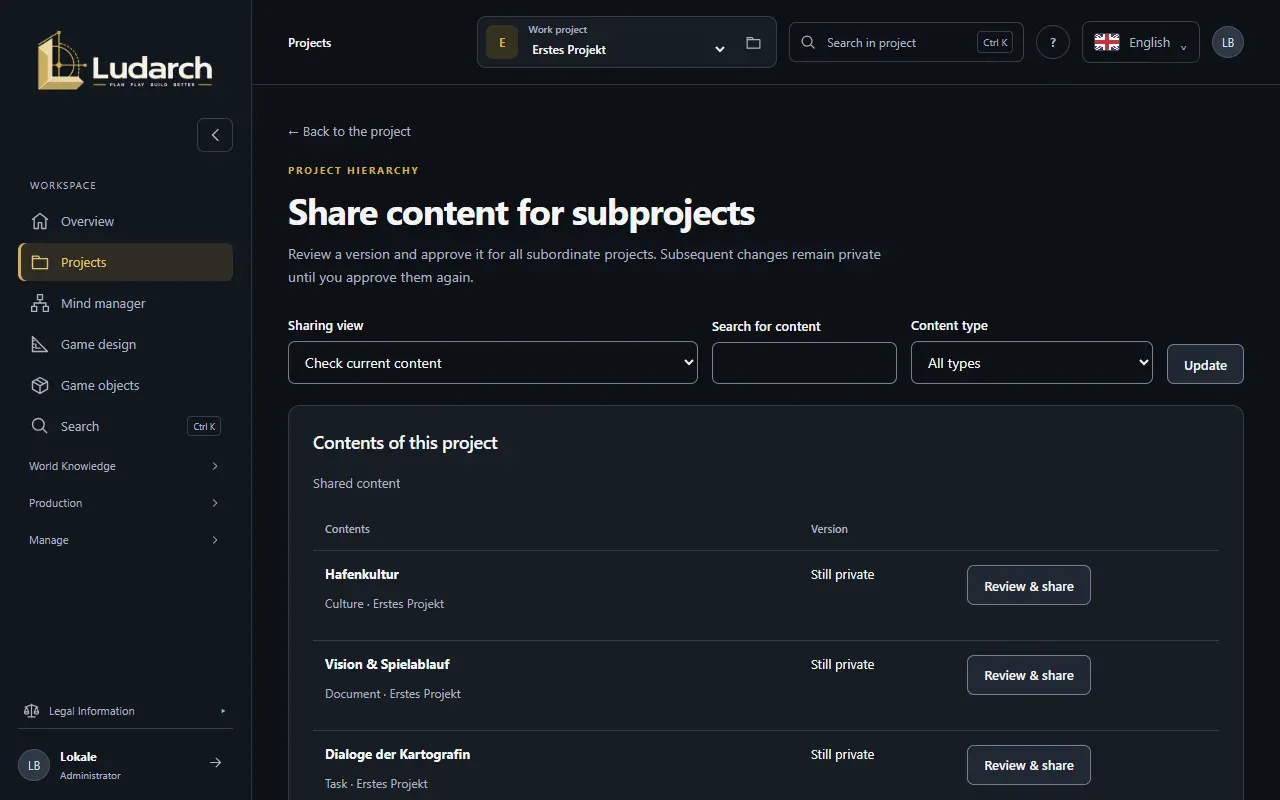
Later changes stay private until you share again — sub-projects keep reading the shared version. Revoke sharing withdraws a shared version; copies already downloaded cannot be recalled.