
Game design
Available in:BasicAdvancedTeam
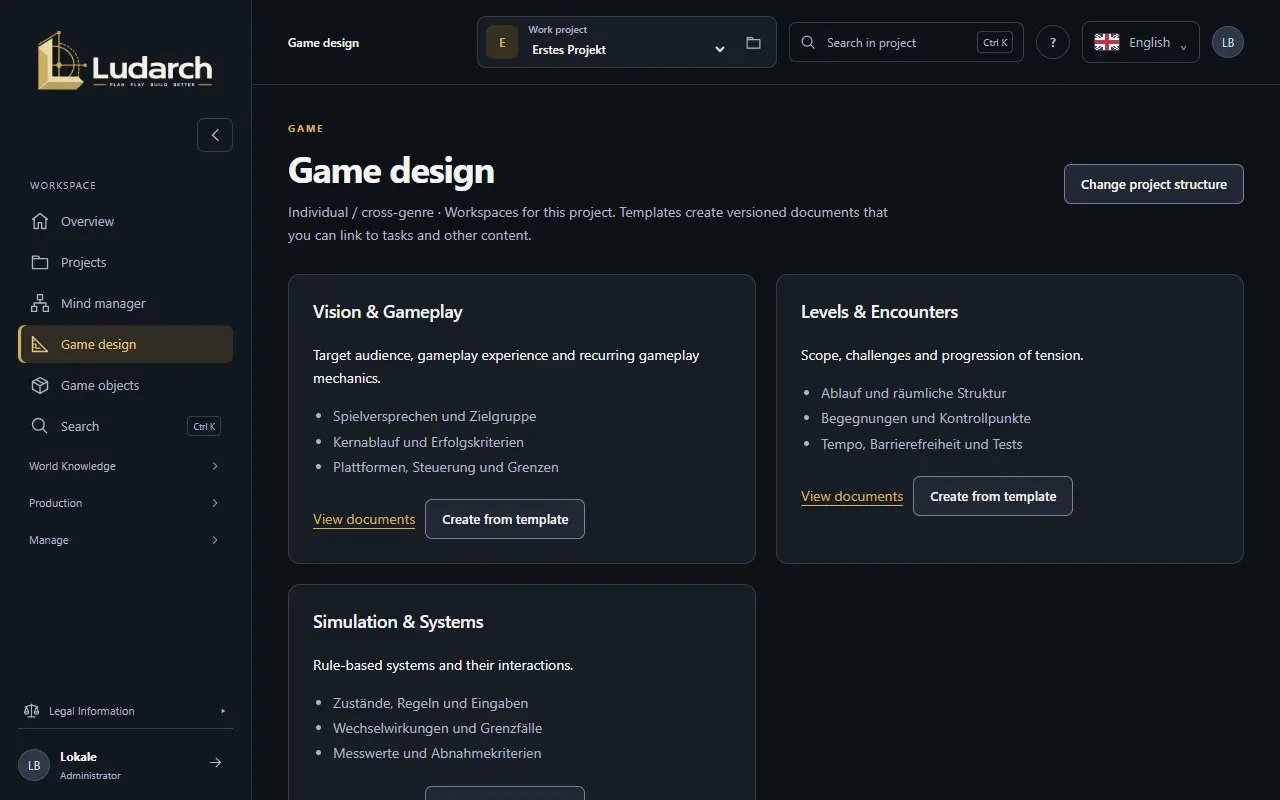
Game design collects the design areas of your project. Ludarch suggests them from the genre: a role-playing game gets Quests & progression and Combat & abilities, a real-time strategy game Units & technology and Maps & missions, and so on. Each area comes with guiding questions that help you think the design through.
Write a design document
Section titled “Write a design document”- Choose Game design in the sidebar.
- Find the area you want to work on, for example Vision & gameplay, and read its guiding questions.
- Click Create from template. Ludarch opens a new document with one section per guiding question.
- Write your answers and save the document. It is versioned like every document (see Documents).
View documents lists every document already written for that area.
Which areas appear
Section titled “Which areas appear”The areas come from the main genre and up to four additional genres of the project. A universe (master project) gets Vision, World & canon and Simulation & systems. To change the genres, click Change project structure — it opens the project page (see Projects).
All project areas
Section titled “All project areas”The panel All project areas at the bottom always links to every tool — game objects, cultures, narrative, documents, tasks, media, video and music production, AI tasks and media, workflows, Git, release packages and the shared library — even if the project has hidden some of them from the sidebar.